

New Jersey Accident / Injury Report
New Jersey centers don't file a generic incident report for an injury. The Office of Licensing publishes its own Accident / Injury Report, and that is what KidzLog produces: the same fields, in the same order, with the same wording your licensing inspector expects to see.
You don't choose it. Report the incident the way you normally would, and when the type is Injury or Allergic reaction, this is the form that comes out.
When You Get This Form
Two things have to be true:
- Your center's address is in New Jersey. That comes from the state on your Center Profile.
- The Incident Type is Injury or Allergic reaction.
Any other type at a New Jersey center produces the Unusual Incident Report instead. Centers outside New Jersey get the standard Incident Report.
Filling It In
You fill in the same incident form as everyone else, with three differences worth knowing.
Some labels change to the Office of Licensing's wording. Where a center elsewhere sees "Affected body part(s)", you see Place on body injury occurred. "First aid given" becomes First aid given at the center, and "What happened?" prints as Describe how injury/accident happened. The questions are the same, so nothing about how you work changes. The words simply match the state form.
There is no abuse-or-neglect question. The Office of Licensing puts safeguarding on its other form, so it isn't asked here. If an injury also raises a safeguarding concern, that belongs on an Unusual Incident Report.
Two fields are optional here. Incident Cause and Actions Taken are required on the standard report, but not on this one, because the Office of Licensing's document has no box for either. You can still fill them in, and whatever you write stays on your center's own copy of the record; you are just not made to. Where injury occurred is still required, since it prints on the form.
What the Filed Report Looks Like
Export Report on the incident opens a print-ready copy in a new tab. See Printing or Saving a Copy for the full steps.
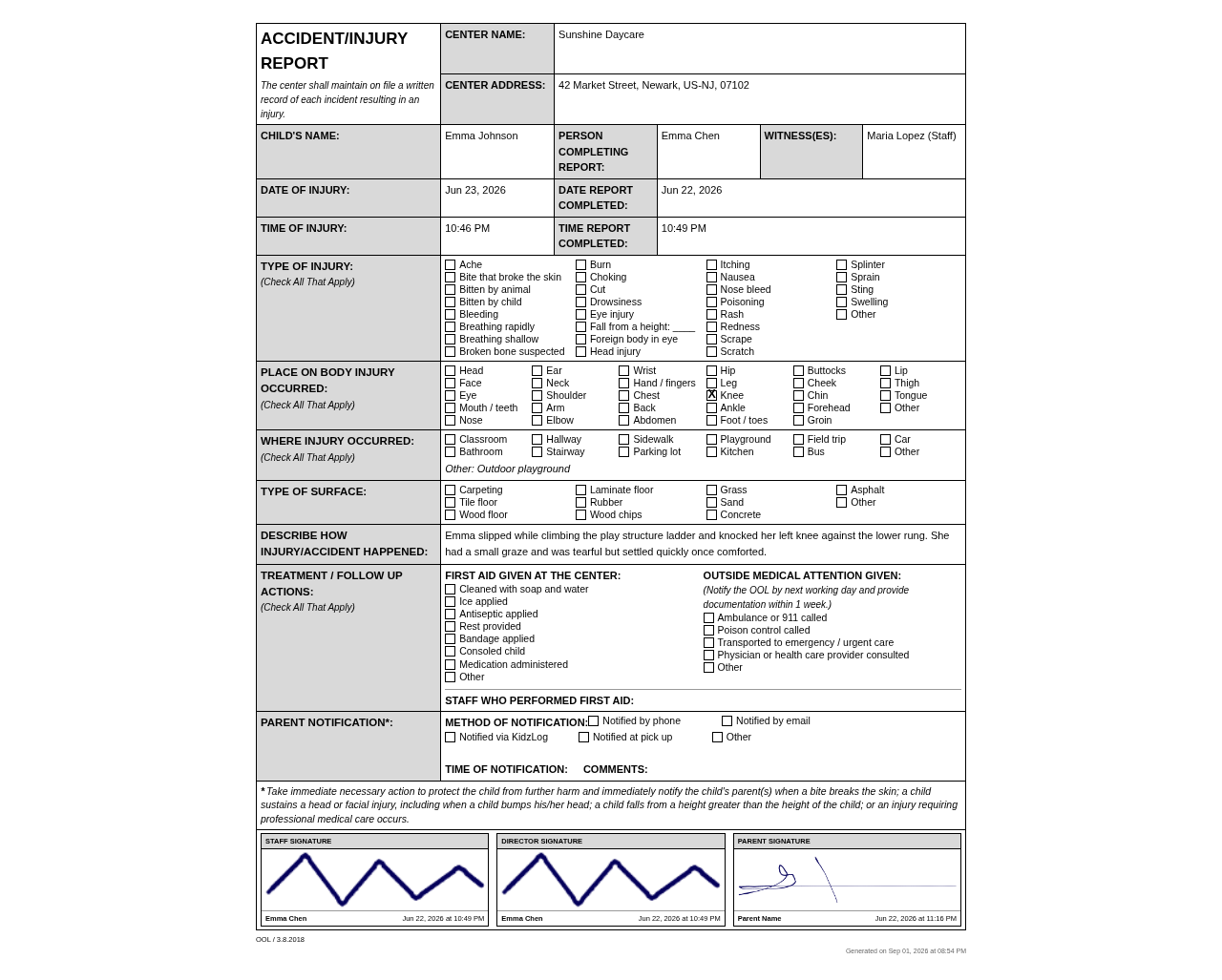
The form carries, in order:
- Your center's name and address in the header, beside the child's name, the person completing the report, and WITNESS(ES)
- WITNESS(ES) is a single header line, so each person appears as their name with their relationship to the child in brackets, for example "Maria Lopez (Teacher)". Where no relationship was recorded, the role (Staff, Child or Other) appears in brackets instead. The age and the "Other important information" note you can record against a witness are not printed here, because the cell is one line deep on the Office of Licensing's own layout
- Date and time of the injury, alongside the date and time the report was completed
- Type of injury, Place on body injury occurred, Where injury occurred, and Type of surface as tick-box grids
- Describe how injury/accident happened, in your words
- Treatment / follow up actions — first aid given at the center, who performed it, and any outside medical attention
- Parent notification — method, time, and comments
- Signature blocks for staff, director, and parent, each with the name and the date and time it was signed
- OOL / 3.8.2018 in the footer, naming the Office of Licensing form this follows, on one line with the date the copy was generated. The footer stays with the signature block, so a report never ends on a page holding nothing but the form code and a date
The Immediate-Action Notice
Above the signatures, the form prints the Office of Licensing's own instruction, word for word. It tells you to take immediate action to protect the child from further harm and to notify the parents right away when:
- a bite breaks the skin
- a child sustains a head or facial injury, including bumping their head
- a child falls from a height greater than the child's own height
- an injury requiring professional medical care occurs
There is a second note beside Outside medical attention given, reminding you to notify the Office of Licensing by the next working day and provide documentation within one week.
Frequently Asked Questions
No. The form follows the incident type: Injury and Allergic reaction produce the Accident / Injury Report, everything else produces the Unusual Incident Report. If an injury also involves a safeguarding concern, file a separate report for that concern so each one lands on the right form.
That depends on a choice your center makes under Settings → Incidents, and until an owner changes it the answer is no: the witnesses line is kept on your copy only. An owner can switch to showing the relationship and age without names, or to showing the line in full. See What parents see of the witnesses list.
Because the Office of Licensing doesn't ask it here. That question, and the Child Abuse Hotline details that follow it, live on the Unusual Incident Report.
The header reads your center's address from Center Profile. Correct it there and export the report again.
Set your center's state to New Jersey on Center Profile. New reports follow the New Jersey forms from then on, and existing reports print on them too, showing whatever was recorded at the time.
Incidents Overview
Report, track, and approve incident reports for children at your center, and file the right report for your state.
New Jersey Unusual Incident Report
How New Jersey centers file the Office of Licensing Unusual Incident Report, including the abuse-or-neglect question and Child Abuse Hotline details, in KidzLog.