

Switching Centers
If you belong to multiple childcare centers — whether as an owner, admin, teacher, or parent — you can switch between them without logging out.
How to Switch Centers
Open the center switcher
Click your avatar at the bottom of the sidebar. The Your Centers modal will open, showing all centers associated with your account.
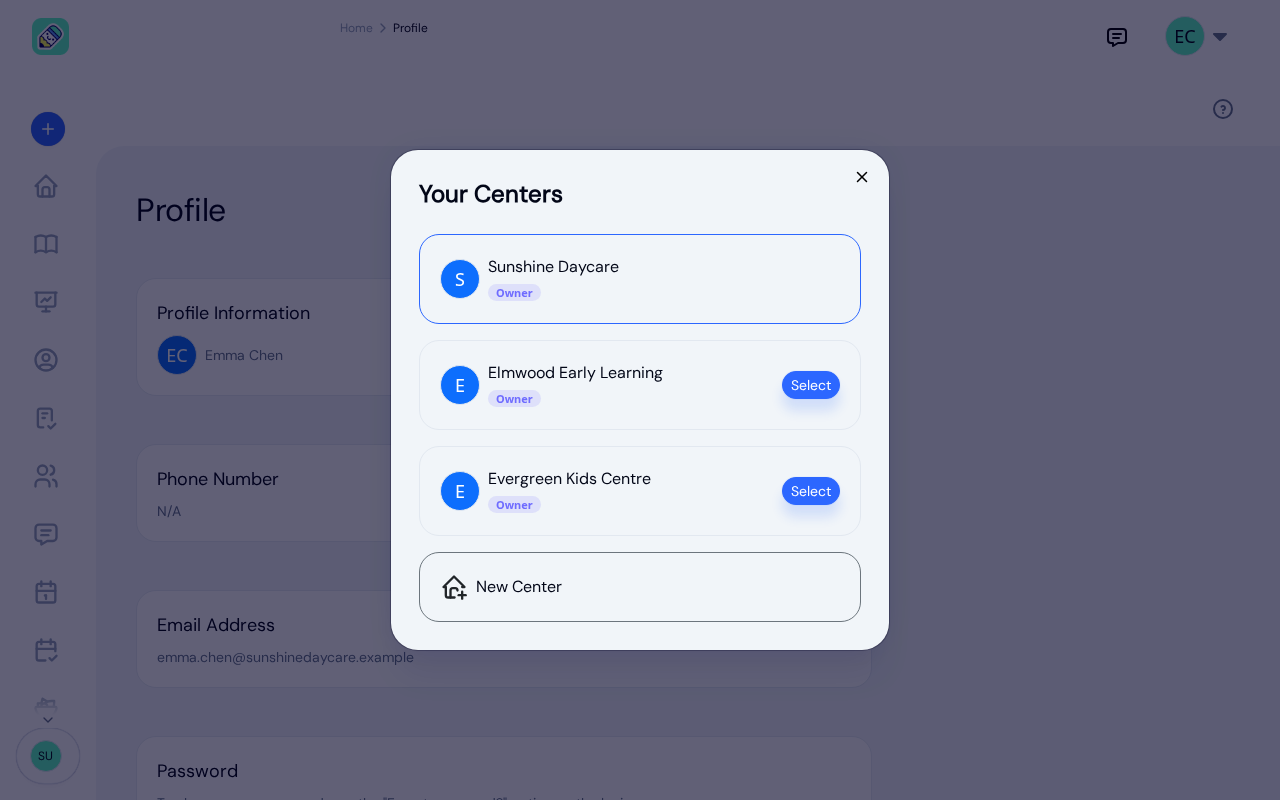
Select a center
Your current center is highlighted at the top. If you belong to multiple centers, each one is listed with your role there and a Select button. Click it to switch, and KidzLog loads that center's data.
The switch is complete straight away. The features that center has turned on, its sidebar links, and its dashboard widgets are all correct as soon as you land, whether or not you hold the same role at both centers. There's no need to reload the page or navigate elsewhere first.
Following a Link from an Email
Links in KidzLog emails open their record in the center it belongs to. If you belong to more than one center and the link is for a different one from the center you're in, KidzLog switches you there first. You'll see a message such as Switched to Sunshine Daycare successfully, and the record opens.
That center becomes your last-used one, so it's where you start the next time you sign in. If you press your browser's Back button to return to a page you reached from such a link, KidzLog switches you back to that link's center again.
If the link is for a center you no longer belong to, you stay in your current center and see The center in that link is no longer available to you.
Your Role May Differ
You can have a different role in each center. For example, you might be an Owner at one center and a Teacher at another. When you switch centers, the dashboard and available features adjust to match your role in that center.
See Roles & Permissions to learn what each role can access.
Creating an Additional Center
To create a new center, scroll to the bottom of the center switcher and click New Center. You'll be taken to the center creation form. See Creating Your Center for the full setup steps.