August's updates focus on the front door of your center: how families reach you, what they can complete without a phone call, and how clearly your records read once they have.
Families Can Apply From Your Own Page
Your center now has a public application page with its own web address. Share it on your website, put it in a reply to an enquiry, or send it to a family on your waitlist. They fill in the child's details and their own, and the application arrives in your review queue. Both you and the family get a confirmation by email, so nobody is left wondering whether the form went through.
An owner opens the page from enrollment settings. It stays closed until you turn it on, and you can close it again when you are full.
You can also decide how an application gets approved. If your center wants more than one person to sign off before a child is admitted, set the steps in order and pick the role for each one. The review queue then shows whose turn each application is on, with an Awaiting my approval filter for your own, and the detail view records who signed and when. The child record is created and the family contacted only when the last person signs off, so nothing is set in motion before the decision is final.
Anyone in the chain can decline or ask for a correction at any step, and an application stays editable while it is in review, which matters when a family leaves out a date of birth. The enrollment feature page covers the pipeline as a whole.
Parents Complete the Whole Form
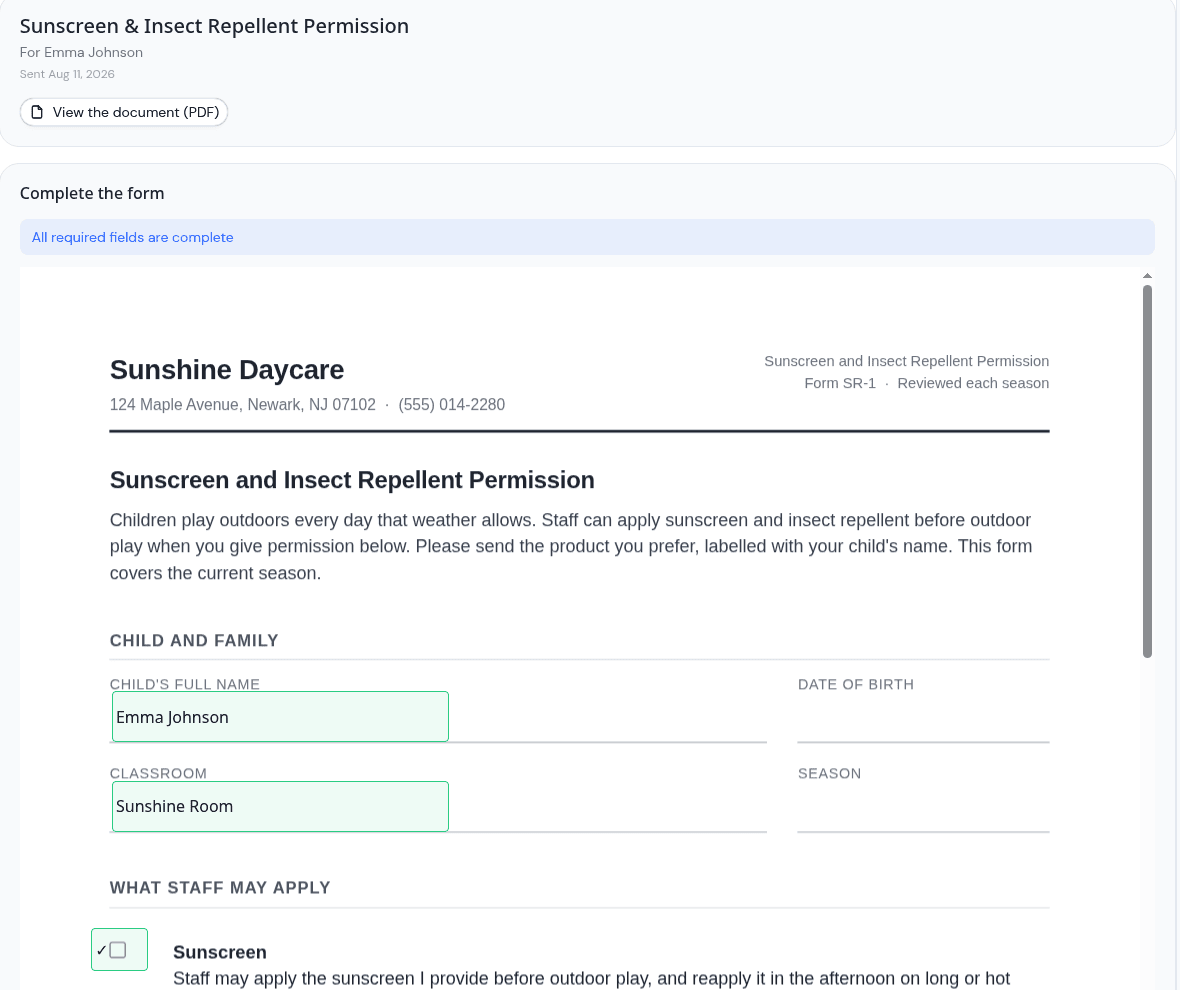
You can now place fields directly on a PDF: signature, date, text, initials, checkbox and dropdown. Put each one where the printed form has a blank, label it so the parent knows what belongs there, and say whether the family fills it in or the center does.
The family opens the document on their own device and completes it in place. What lands in your records is the finished form, which is what a licensing form is meant to be. When you upload a reworded version later, the field positions carry across, and the new version is held for a quick check before it can be sent, so a signature box never ends up over the wrong line.
The full write-up is in parents can now fill in the form, not just sign it, and the documents feature page covers the module. Childcare paperwork is ongoing, and we want to make it easier, so our guide to collecting signed enrollment paperwork is worth a read alongside it.
Multiple Check-Ins and Check-Outs on the Report
A child who is collected for an appointment and brought back has made two visits, and the attendance report now shows both, each with its own arrival and departure time. A stay that runs past midnight is reported against the day it began, and appears on the following day marked as a carry-over.
Times on the report read in your center's own time zone, taken from your center address. That applies everywhere a check-in time is shown: your screen, the confirmation emails, and the QR check-in page on a parent's phone. Set your address under center settings and everything follows from it. See the attendance feature page for how the report is put together.
A check-in also takes precedence over an absent mark. If a child was marked absent in the morning and then arrives, the day reads as present.
Also New
Payment Dates on Invoices
An invoice now records the date it was paid, and revenue counts in the month the money arrived. A January invoice settled in March counts as March revenue, and the dashboard's trailing chart follows the same rule.
Health Screening Alerts Follow Preferences
A failed health screening notification now respects each person's notification settings, for admins and for parents. Guardians with a login receive them, and anyone can opt out from their own preferences.
Incident Reports Name Who Was Involved
An incident report can record everyone involved, and you choose what a parent sees on their copy.
A Note on a Menu Day
Write a note against any day of a menu, for the days that need a word of explanation.
Also Announced in August
Four changes got their own write-ups:
- Menus by room and clearer allergy alerts: run an infant menu alongside a center-wide one, plan a whole month before saving, and record allergies from a set list
- Send a document to a classroom or program: send the same form to a whole room at once
- Archive a classroom: retire a room after reenrollment while last year's reports still name it
- A child's address and health care provider: both on the profile, in Health Information, and on the exported file
Improvements
- Improved pagination for long lists and exports: classroom and program pickers, team lists, pending invites, announcement tabs and dashboard counts show every entry. Exports carry every matching row, which matters when the file is going to a licensing visit.
- A clear reason when a save is rejected: where a change cannot be saved, KidzLog names the reason so you know what to change.
- Calendar exports cover the month: exporting from the list view gives you the whole month's events.
Also Improved
- Allergy warnings appear for every child selected when logging a meal
- The dashboard reports today's allergy conflicts across every menu running that day
- Classrooms stay listed when the program they belonged to is removed
- The fee selector is populated when moving or bulk-enrolling children
- Attendance notes can be removed as well as added
- Invoice actions are available on mobile
- Calendar dates hold the day they were entered on
Ready to Simplify and Organize your Daycare?
Get started with KidzLog today!
KidzLog Team
Related Articles
June Update: Document Signing and QR Check-In
Send documents for online signatures, offer QR check-in, file audit-ready incident reports, and review enrollment...
September Update: Incident Reports and Records
Reopen and correct an approved incident report, choose when parents get the email, send families a note on declined...
Parents can now fill in the form, not just sign it
Place signature, date, text and checkbox fields anywhere on a PDF, and parents complete the whole form on their own...