New: A Child's Address and Health Care Provider
Most licensing checklists for a child's file ask for two things KidzLog now records: where the child lives, and who their doctor is.
Both are new fields on the child record, and both are optional.
The child's address
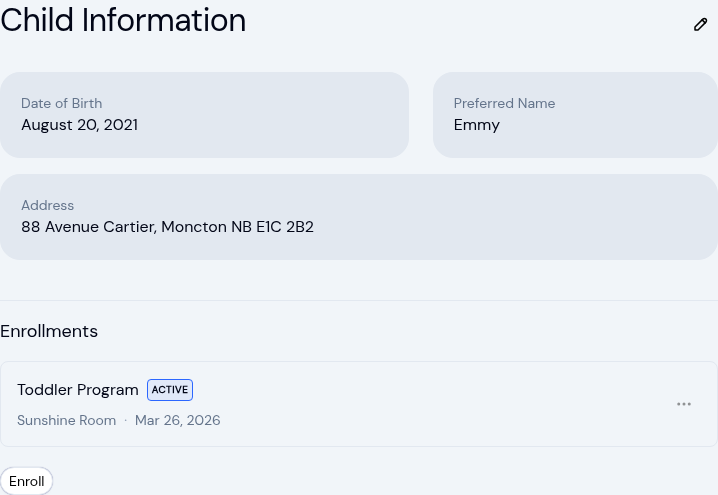
You will find Address in Edit Child Information, below date of birth. Open that form with the pencil next to the Child Information heading on a child's profile. Once saved, the address shows on the profile next to the child's preferred name.
This is the child's address, not the parent's. A child in foster placement, a child living with a grandparent, and a child who splits the week between two homes do not necessarily live at their parent's address, so the field is set per child rather than copied from a guardian's profile.
It is a single text box. Enter the address in whatever format the family gives you.
The child's health care provider
Health Information now includes a Health Care Provider block with a name, a phone number and an address. It sits below the medical conditions, immunizations and allergies you already record there, and you edit it in Edit Child Information, in the same place as the address.
It holds one provider: the child's regular doctor or clinic. For a specialist a child sees for a particular condition, use the medication and instructions fields on that allergy or medical condition, which is where KidzLog already keeps that detail.
Both are optional
Neither field is required. A child without them shows "N/A" for the address and an empty Health Care Provider block, and nothing asks you to fill them in for children already in your account.
Add them as families give them to you, or as you work through your files before a licensing renewal.
Owners and admins can edit both fields. Teachers and parents see them on the child's profile but cannot change them, which is how the rest of a child's information already works.
Where else they show up
Both print on the exported child record, the PDF you generate from a child's profile when someone asks for a copy of their file. That document already includes parents, emergency contacts, medical conditions, allergies and immunizations.
Changes are recorded in activity history, which shows who changed the address, when, and what it was before. This is the same record of changes kept for attendance and for the enrolment documents you collect and sign.
Ready to Simplify and Organize your Daycare?
Get started with KidzLog today!
KidzLog Team
Related Articles
September Update: Incident Reports and Records
Reopen and correct an approved incident report, choose when parents get the email, send families a note on declined...
New: Delete Your Center From Settings
Owners can schedule their center's deletion from Settings, keep a full copy of their records, and restore the center...
New: Export All of Your Center's Data
Owners can now download everything their center keeps in KidzLog: records as spreadsheets, documents, signatures,...