Essential Technology Tools for Childcare Operations
Technology adoption in childcare isn't just about staying current—it's about survival and growth in an increasingly competitive marketplace. Today, childcare centers that leverage technology report up to 40% administrative workload reduction compared to traditional paper-based operations. For childcare providers across North America looking to reduce administrative burden, enhance safety protocols, and improve parent engagement, this comprehensive guide provides a roadmap for successful technology integration.
The modern childcare landscape demands solutions that address staffing challenges, regulatory compliance requirements, and evolving parent expectations. From digital check-in systems that enhance security to comprehensive management platforms that automate billing and communications, the right technology stack can transform your center's operations while maintaining the personal touch that families value.
This guide examines proven technology solutions, provides implementation strategies with realistic timelines, and offers ROI calculations to help you make informed investment decisions that benefit both your operational efficiency and your bottom line. For a step-by-step implementation walkthrough, see our companion guide on how to implement childcare management software.
Understanding the Current Technology Landscape in Childcare
The Digital Transformation Context
The childcare industry has undergone rapid digitization since 2020, with significant acceleration in technology adoption since 2020 across North American centers. Today's successful childcare providers recognize that technology isn't replacing human connections—it's enabling staff to spend more quality time with children by automating routine administrative tasks.
Modern parents expect real-time communication, digital documentation, and seamless payment processing. Simultaneously, regulatory bodies in both the United States and Canada are increasingly requiring digital record-keeping for compliance purposes. This convergence creates both opportunity and necessity for childcare centers to embrace comprehensive technology solutions.
Centers that successfully integrate technology report significant improvements in staff satisfaction, particularly given that childcare worker turnover is 65% higher than typical occupations, making operational efficiency crucial for staff retention. The key lies in choosing solutions that complement your existing workflows rather than disrupting them.
Geographic Considerations for Technology Implementation
United States Requirements:
- State-specific licensing database integration
- CCDF (Child Care Development Fund) reporting capabilities
- Food program documentation requirements
- Background check system integration
Canadian Requirements:
- Provincial licensing system compatibility
- Canada Child Care Benefit (CCB) reporting
- Provincial health and safety documentation
- Bilingual capability requirements (particularly in Quebec)
- Quebec Bill 96 requirements: Quebec centers with 25+ employees must comply with French language requirements by June 1, 2025
Understanding these regulatory differences ensures your technology investments support compliance rather than creating additional administrative burden.
Core Technology Categories for Childcare Operations
1. Comprehensive Management Platforms
What They Include:
- Child enrollment and family information management
- Staff scheduling and payroll integration
- Billing and payment processing
- Regulatory compliance tracking
- Parent communication portals
- Attendance and check-in/check-out systems
Key Features to Evaluate:
- Scalability: Can the system grow with your center?
- Integration capabilities: Does it connect with existing tools?
- Mobile accessibility: Can staff and parents access it anywhere?
- Customization options: Can you adapt it to your specific needs?
- Data security: Does it meet childcare industry standards?
Implementation Timeline: 6-8 weeks
- Weeks 1-2: System setup and data migration
- Weeks 3-4: Staff training and testing
- Weeks 5-6: Parent onboarding and feedback collection
- Weeks 7-8: Full implementation and optimization
ROI Calculation Example: For a 100-child center with 15 staff members:
- Annual software cost: $3,600 (average $300/month)
- Administrative time savings: 15 hours/week × $20/hour = $15,600/year
- Reduced billing errors: $2,400/year
- Net annual savings: $14,400
2. Digital Attendance and Check-In Systems
Security-Enhanced Options:
- Biometric systems: Fingerprint or facial recognition
- Smart card systems: RFID or proximity cards
- Mobile app check-ins: Smartphone-based authentication
- Integrated camera systems: Photo documentation of arrivals/departures
Safety Benefits:
- Unauthorized pickup prevention
- Real-time attendance tracking
- Emergency evacuation lists
- Parent notification systems
- Visitor management protocols
Implementation Considerations:
- Hardware requirements: Tablets, card readers, cameras
- Network infrastructure: Reliable Wi-Fi throughout facility
- Backup systems: Manual procedures for technology failures
- Training requirements: Staff and parent education programs
Cost-Benefit Analysis:
- Initial setup: $2,000-5,000 (depending on center size)
- Annual savings from reduced administrative time: $8,000-12,000
- Improved security and compliance value: Immeasurable
3. Parent Communication and Engagement Platforms
Essential Communication Features:
- Real-time messaging: Direct teacher-to-parent communication
- Photo and video sharing: Daily activity documentation
- Digital portfolios: Child development tracking
- Event notifications: Important announcements and reminders
- Multilingual support: Serving diverse family populations
Advanced Engagement Tools:
- Learning milestone tracking: Developmental progress documentation
- Digital lesson plans: Transparency in educational programming
- Behavior incident reporting: Immediate notification systems
- Conference scheduling: Streamlined parent-teacher meetings
- Volunteer coordination: Community engagement opportunities
Implementation Strategy:
- Phase 1 (Week 1-2): Staff training and basic messaging setup
- Phase 2 (Week 3-4): Parent onboarding and photo sharing
- Phase 3 (Week 5-6): Advanced features and portfolio creation
- Phase 4 (Week 7-8): Full integration and feedback optimization
4. Staff Scheduling and Management Systems
Core Scheduling Functions:
- Automated shift assignments: Based on qualifications and availability
- Substitute teacher coordination: Emergency coverage systems
- Professional development tracking: Certification and training management
- Performance evaluation systems: Digital assessment tools
- Communication platforms: Staff messaging and updates
Compliance Features:
- Certification tracking: ECE requirements and renewal dates
- Background check management: Regular update notifications
- Ratio monitoring: Child-to-staff compliance alerts
- Break scheduling: Labor law compliance automation
- Overtime tracking: Budget management tools
ROI for Staff Management:
- Reduced scheduling conflicts: 5-8 hours/week saved
- Improved staff retention: 15-20% reduction in turnover costs
- Enhanced compliance: Reduced regulatory violations and fines
- Better coverage: 90% reduction in scheduling gaps
5. Financial Management and Billing Systems
Automated Billing Features:
- Flexible fee structures: Hourly, daily, weekly, or monthly rates
- Late pickup charges: Automatic calculation and notification
- Multi-child discounts: Family-friendly pricing options
- Subsidy management: Government funding tracking
- Payment processing: Credit cards, ACH, and digital wallets
Financial Reporting Capabilities:
- Cash flow projections: Monthly and quarterly forecasting
- Enrollment analytics: Capacity optimization insights
- Expense tracking: Operational cost management
- Tax reporting: Simplified year-end documentation
- Profit analysis: Program-specific profitability assessment
Implementation Benefits:
- Reduced payment delays: 40% improvement in on-time payments
- Decreased billing errors: 85% reduction in manual mistakes
- Improved cash flow: More predictable revenue streams
- Enhanced parent satisfaction: Convenient payment options
6. Learning Management and Curriculum Systems
Curriculum Management Tools:
- Lesson plan templates: Age-appropriate activity libraries
- Assessment tracking: Developmental milestone documentation
- Portfolio creation: Digital memory books for families
- Resource libraries: Educational material organization
- Progress reporting: Standardized development reports
Integration with Educational Standards:
- State learning guidelines: Curriculum alignment tools
- School readiness tracking: Kindergarten preparation assessment
- Individual learning plans: Customized educational approaches
- Special needs accommodation: Inclusive program support
- Family engagement: Home extension activities
Technology-Enhanced Learning:
- Interactive whiteboards: Group learning experiences
- Educational tablets: Age-appropriate app integration
- Digital storytelling: Creative expression tools
- Virtual field trips: Expanded learning opportunities
- STEM programming: Technology literacy development
7. Health and Safety Monitoring Systems
Health Tracking Features:
- Daily health checks: Symptom monitoring and documentation
- Medication administration: Automated reminders and logging
- Allergy alerts: Emergency information accessibility
- Incident reporting: Comprehensive documentation systems
- Emergency contact management: Rapid communication capabilities
Safety Compliance Tools:
- Fire drill tracking: Regulatory requirement documentation
- Equipment inspection logs: Maintenance schedule management
- Visitor management: Security and background verification
- Emergency preparedness: Response plan coordination
- Risk assessment: Hazard identification and mitigation
Integration with Healthcare Providers:
- Pediatrician communication: Health information sharing
- Immunization tracking: Compliance monitoring
- Special healthcare needs: Individualized care plans
- Emergency medical information: Quick access during incidents
Technology Integration Strategy and Implementation
Assessment Phase: Evaluating Current Systems
Current State Analysis:
- Document existing processes: Map current workflows and identify pain points
- Assess technology infrastructure: Evaluate hardware, software, and network capabilities
- Survey stakeholder needs: Gather input from staff, parents, and administrators
- Identify compliance gaps: Review regulatory requirements and current documentation
- Calculate baseline metrics: Establish performance measurements for improvement tracking
Readiness Evaluation:
- Staff technology comfort level: Training requirements assessment
- Budget availability: Investment capacity and ROI expectations
- Implementation timeline: Realistic scheduling considerations
- Change management capacity: Organizational readiness for transformation
Vendor Selection Criteria
Essential Evaluation Factors:
- Industry specialization: Childcare-specific feature development
- Compliance expertise: Regulatory knowledge and support
- Customer support quality: Response times and resolution effectiveness
- Data security standards: Encryption, backup, and privacy protection
- Integration capabilities: Compatibility with existing systems
- Scalability options: Growth accommodation features
- Training and onboarding: Implementation support quality
- Pricing transparency: Clear cost structure and contract terms
Due Diligence Process:
- Reference checks: Contact current customers in similar markets
- Trial periods: Hands-on evaluation before commitment
- Security audits: Verification of data protection measures
- Compliance verification: Regulatory requirement confirmation
- Contract negotiation: Terms, support levels, and exit clauses
Implementation Timeline and Project Management
Phase 1: Foundation (Weeks 1-4)
- Infrastructure assessment and upgrade
- Vendor selection and contract finalization
- Project team assembly and training
- Data backup and migration preparation
- Communication plan development
Phase 2: Core System Deployment (Weeks 5-8)
- Primary platform installation and configuration
- Data migration and validation
- Initial staff training programs
- Basic functionality testing
- Parent communication about upcoming changes
Phase 3: Feature Expansion (Weeks 9-12)
- Advanced feature activation
- Integration with secondary systems
- Comprehensive staff training completion
- Parent onboarding and training
- Feedback collection and initial optimization
Phase 4: Full Integration (Weeks 13-16)
- Complete system utilization
- Process refinement based on feedback
- Advanced training for power users
- Performance measurement and optimization
- Continuous improvement planning
Training and Change Management
Staff Training Strategy:
- Champions program: Identify technology-comfortable staff as peer trainers
- Hands-on workshops: Practical training in realistic scenarios
- Documentation creation: Quick reference guides and troubleshooting resources
- Ongoing support: Regular check-ins and advanced training opportunities
- Feedback loops: Continuous improvement based on user experience
Parent Onboarding Process:
- Introduction communication: Explain benefits and timeline
- Tutorial sessions: Group and individual training opportunities
- Step-by-step guides: Written and video instruction materials
- Support hotline: Dedicated assistance for questions
- Gradual rollout: Phased introduction of features
Change Management Best Practices:
- Clear communication: Regular updates on progress and benefits
- Expectation setting: Realistic timelines and learning curves
- Success celebration: Acknowledge milestones and improvements
- Problem resolution: Quick response to issues and concerns
- Cultural integration: Align technology use with center values
Security, Privacy, and Compliance Considerations
Data Protection Requirements
Legal Framework Compliance:
- COPPA (Children's Online Privacy Protection Act): US requirements for children's data, with penalties up to $53,088 per violation in 2025
- PIPEDA (Personal Information Protection and Electronic Documents Act): Canadian privacy legislation
- State/Provincial regulations: Local privacy and data protection laws
- FERPA considerations: Educational record protection requirements
Technical Security Measures:
- End-to-end encryption: Data protection during transmission and storage
- Access controls: Role-based permissions and authentication
- Audit trails: Comprehensive logging of system access and changes
- Backup systems: Regular data backup and disaster recovery plans
- Network security: Firewall protection and intrusion detection
Privacy Policy Development:
- Data collection transparency: Clear explanation of information gathered
- Usage limitations: Specific purposes for data utilization
- Sharing restrictions: Third-party access policies
- Retention schedules: Data storage and deletion timelines
- Parent rights: Access, correction, and deletion procedures
Regulatory Compliance Integration
United States Compliance Requirements:
- State licensing databases: Integration with regulatory systems
- Child and Adult Care Food Program: Nutrition documentation
- Background check systems: Staff verification processes
- Quality Rating and Improvement Systems (QRIS): Assessment integration
- Americans with Disabilities Act (ADA): Accessibility requirements
- CCDF 2024 final rule: Changes affecting FY 2025-2027 compliance requirements
Canadian Compliance Requirements:
- Provincial licensing systems: Regulatory reporting integration
- Canadian Food Guide: Nutrition planning and documentation
- Enhanced background checks: Criminal record verification
- Indigenous cultural requirements: Culturally appropriate programming
- Official Languages Act: Bilingual capability requirements
Risk Management and Business Continuity
Technology Risk Assessment:
- System failure scenarios: Backup procedures and manual alternatives
- Data breach response: Incident management and notification procedures
- Vendor dependency: Contingency planning for service disruptions
- Staff turnover: Knowledge transfer and access management
- Equipment failure: Hardware replacement and temporary solutions
Business Continuity Planning:
- Emergency operating procedures: Manual backup systems
- Communication protocols: Crisis management and parent notification
- Data recovery processes: Restoration procedures and timelines
- Alternative service delivery: Temporary operational modifications
- Insurance considerations: Technology and cyber liability coverage
Measuring Success and Return on Investment
Key Performance Indicators (KPIs)
Operational Efficiency Metrics:
- Administrative time reduction: Hours saved per week
- Billing accuracy improvement: Error rate reduction percentage
- Communication response time: Parent inquiry resolution speed
- Attendance tracking efficiency: Check-in/out process duration
- Staff scheduling optimization: Scheduling conflict reduction
Financial Performance Indicators:
- Revenue cycle improvement: Payment processing time reduction
- Cost per enrolled child: Overall operational cost efficiency
- Staff retention rates: Turnover reduction and recruitment savings
- Parent satisfaction scores: Retention and referral improvements
- Compliance cost reduction: Regulatory violation prevention savings
Quality Improvement Measures:
- Parent engagement levels: App usage and communication frequency
- Educational documentation quality: Assessment and portfolio completion
- Safety incident reduction: Accident and security breach prevention
- Teacher-child interaction time: Increased direct care hours
- Program quality assessments: External evaluation improvements
ROI Calculation Methodology
Direct Cost Savings:
- Administrative labor reduction: Staff time × hourly rate × weeks per year
- Billing error prevention: Historical error costs × reduction percentage
- Supply cost reduction: Paper, printing, and storage savings
- Communication costs: Phone, mail, and meeting expense reduction
- Compliance penalty avoidance: Historical violation costs × prevention rate
Revenue Enhancement:
- Enrollment increase: Technology attraction × average annual tuition
- Parent retention improvement: Reduced turnover × replacement costs
- Program quality premiums: Enhanced reputation × fee increase potential
- Efficiency capacity expansion: Additional enrollment without proportional cost increase
Example ROI Calculation for 75-Child Center:
- Annual technology investment: $4,500
- Administrative time savings: 12 hours/week × $18/hour × 50 weeks = $10,800
- Billing error reduction: $1,800/year
- Increased enrollment: 3 children × $8,000 average tuition = $24,000
- Total annual benefit: $36,600
- ROI: ($36,600 - $4,500) ÷ $4,500 = 713%
Note: Implementation costs can range from $20,000-$250,000 for custom solutions depending on center size and complexity. The childcare technology market, valued at $234 million in 2024, is projected to reach $469 million by 2033, reflecting growing adoption across the industry.
Long-Term Value Assessment
Strategic Benefits:
- Market competitiveness: Technology differentiation in local market
- Scalability preparation: Foundation for future growth
- Staff professional development: Technology skill enhancement
- Data-driven decision making: Analytics for operational optimization
- Innovation capacity: Readiness for emerging technology adoption
Sustainability Considerations:
- Technology lifecycle planning: Upgrade and replacement scheduling
- Vendor relationship management: Long-term partnership development
- Staff technology literacy: Ongoing education and skill development
- System integration evolution: Platform expansion and enhancement
- Regulatory compliance adaptation: Technology adjustment for changing requirements
Future-Proofing Your Technology Investment
Emerging Trends in Childcare Technology
Artificial Intelligence Integration:
- Predictive analytics: Enrollment forecasting and capacity optimization
- Personalized learning: AI-driven curriculum recommendations
- Automated documentation: Voice-to-text daily reports and assessments
- Smart scheduling: Optimal staff and resource allocation
- Early intervention identification: Developmental milestone analysis
Internet of Things (IoT) Applications:
- Environmental monitoring: Air quality, temperature, and humidity tracking
- Smart security systems: Automated access control and monitoring
- Health monitoring devices: Wearable technology for safety tracking
- Interactive learning environments: Responsive educational spaces
- Equipment maintenance: Predictive maintenance and replacement scheduling
Virtual and Augmented Reality:
- Virtual field trips: Immersive educational experiences
- Professional development: Virtual training and conference participation
- Parent engagement: Virtual classroom visits and event participation
- Emergency preparedness: Virtual drill practice and safety training
- Cultural exploration: Global learning and diversity education
Technology Evolution Preparation
Scalability Planning:
- Modular system architecture: Component-based technology selection
- API-first approach: Integration-friendly platform choices
- Cloud-native solutions: Scalable infrastructure and storage
- Open standards adoption: Vendor-neutral technology decisions
- Regular upgrade scheduling: Proactive system enhancement
Innovation Adoption Strategy:
- Pilot program development: Small-scale testing of new technologies. For educational technology specifically, see our guide on enhancing learning with technology in childcare
- Industry trend monitoring: Continuous market research and evaluation
- Professional development investment: Staff technology education
- Partnership cultivation: Vendor and educational institution relationships
- Budget allocation: Dedicated innovation and upgrade funding
Implementation Support and Resources
Professional Development and Training
Staff Technology Literacy Programs:
- Basic computer skills: Fundamental technology competency development
- Platform-specific training: Comprehensive system utilization education
- Troubleshooting capabilities: Problem-solving and self-help skills
- Advanced feature utilization: Power user development and leadership
- Peer mentoring programs: Collaborative learning and support systems
Administrative Technology Management:
- System administration: User management and security oversight
- Data analysis skills: Report generation and interpretation
- Vendor relationship management: Contract negotiation and support coordination
- Strategic planning: Technology roadmap development and implementation
- Budget management: ROI tracking and investment planning
Community and Industry Resources
Professional Organizations:
- National Association for the Education of Young Children (NAEYC): Technology guidance and best practices
- Child Care Aware of America: Resource development and support
- National Association of Child Care Professionals (NACCP): Industry standards and certification
- Early Childhood Education and Care Canada: Canadian perspective and resources
- Provincial and state childcare associations: Local regulation and support
Technology Support Networks:
- User communities: Platform-specific forums and discussion groups
- Professional consultants: Implementation and optimization specialists
- Industry conferences: Technology showcases and educational sessions
- Online training platforms: Skill development and certification programs
- Vendor support services: Technical assistance and ongoing education
Continuous Improvement Framework
Regular Assessment Protocols:
- Quarterly system reviews: Performance evaluation and optimization
- Annual technology audits: Comprehensive system and security assessment
- Stakeholder feedback collection: Staff, parent, and child input gathering
- Competitive analysis: Market comparison and feature evaluation
- ROI measurement: Financial impact assessment and reporting
Optimization Strategies:
- Process refinement: Workflow improvement and efficiency enhancement
- Feature utilization expansion: Advanced capability adoption
- Integration enhancement: System connectivity and data flow improvement
- Training program advancement: Skill development and competency building
- Strategic planning updates: Technology roadmap revision and enhancement
Key Implementation Takeaways
Start Small, Think Big
- Begin with core needs: Address your most pressing operational challenges first
- Choose integrated solutions: Select platforms that can grow with your needs
- Plan for scalability: Ensure your technology choices support future expansion
- Maintain human connections: Use technology to enhance, not replace, personal relationships
- Budget for ongoing costs: Include training, support, and upgrade expenses
Focus on User Experience
- Prioritize intuitive design: Choose systems that staff and parents can easily navigate
- Provide comprehensive training: Invest in proper onboarding and ongoing education
- Gather regular feedback: Create channels for continuous improvement input
- Maintain backup procedures: Ensure manual alternatives for critical processes
- Celebrate success milestones: Acknowledge improvements and efficiency gains
Ensure Compliance and Security
- Verify regulatory alignment: Confirm technology meets all legal requirements
- Implement robust security: Protect child and family data with appropriate measures
- Document procedures: Create clear protocols for system use and emergency situations
- Regular security audits: Maintain ongoing assessment of data protection measures
- Stay informed: Keep current with changing regulations and security best practices
Measure and Optimize
- Track key metrics: Monitor ROI, efficiency gains, and user satisfaction
- Regular system reviews: Assess performance and identify improvement opportunities
- Plan for growth: Ensure technology can accommodate increasing enrollment and complexity
- Maintain vendor relationships: Cultivate partnerships for ongoing support and enhancement
- Budget for evolution: Allocate resources for upgrades, training, and new feature adoption
Build for the Future
- Choose flexible platforms: Select solutions that can adapt to changing needs. For a deeper dive into record keeping, see our guide on daycare record keeping software
- Invest in staff development: Build technology competency across your team
- Stay connected: Participate in industry networks and professional development
- Plan strategically: Develop long-term technology roadmaps aligned with business goals
- Embrace innovation: Remain open to emerging technologies that can enhance your program
Ready to streamline your childcare center operations with proven technology solutions? Discover how KidzLog integrates all essential childcare management functions into one comprehensive platform designed specifically for North American childcare providers. Start your transformation today and see how technology can enhance both operational efficiency and educational excellence.
Ready to Simplify and Organize your Daycare?
Get started with KidzLog today!
KidzLog Team
Related Articles
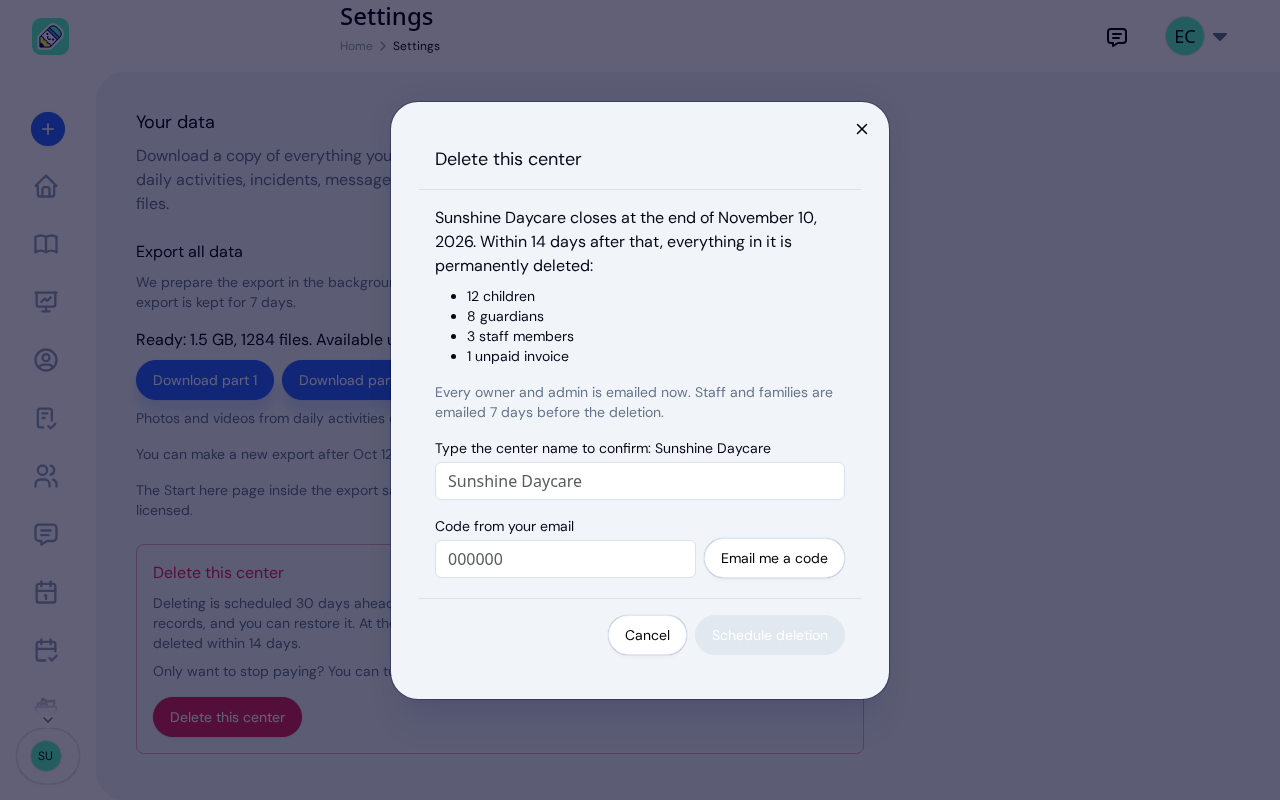
New: Delete Your Center From Settings
Owners can schedule their center's deletion from Settings, keep a full copy of their records, and restore the center...
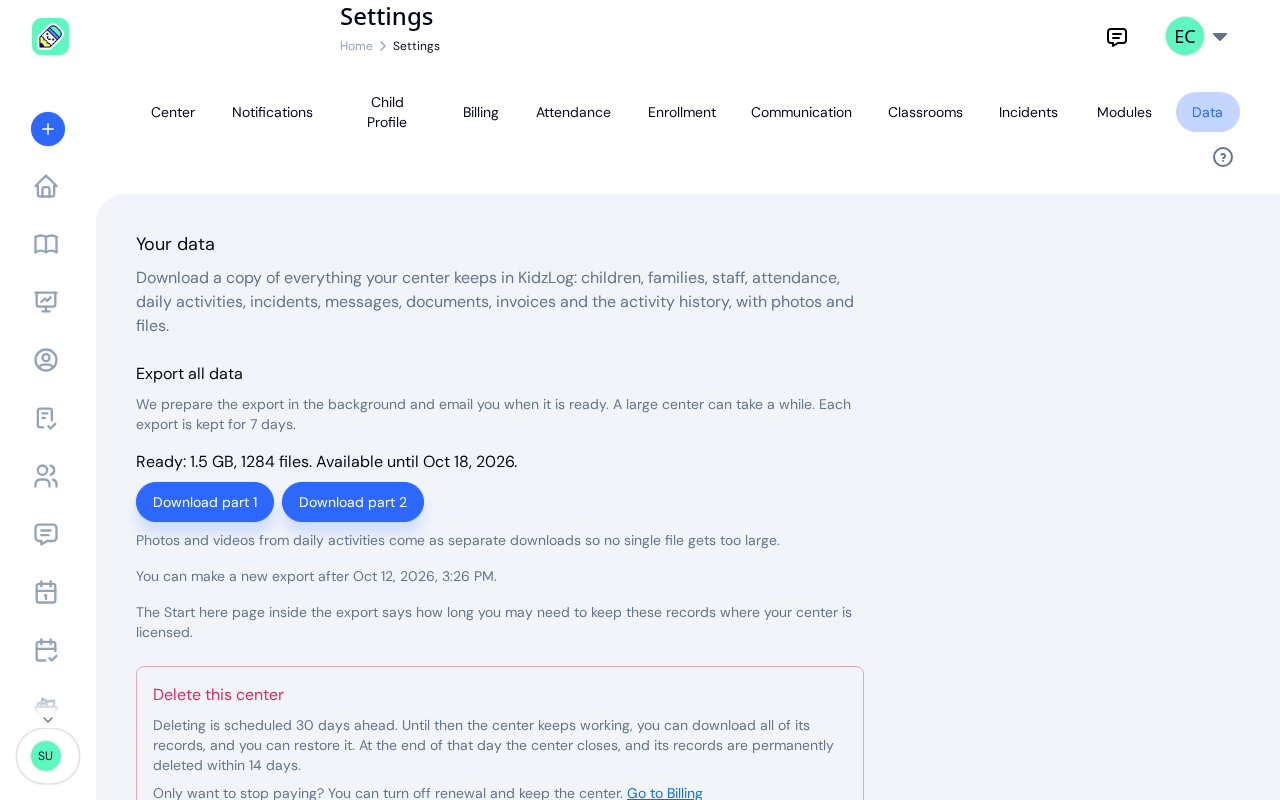
New: Export All of Your Center's Data
Owners can now download everything their center keeps in KidzLog: records as spreadsheets, documents, signatures,...
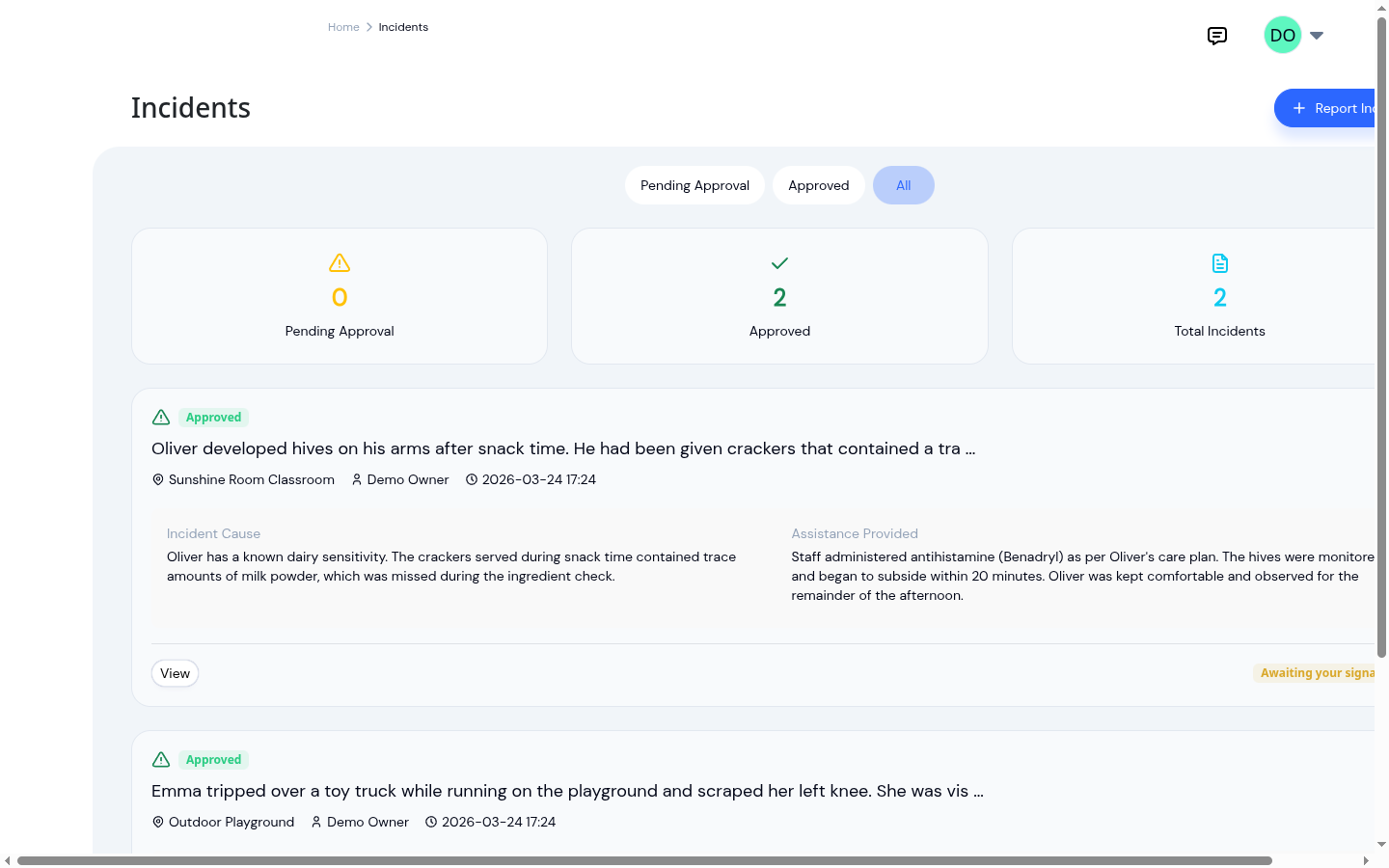
Paper vs digital incident reports
Paper vs digital incident reports compared on time spent writing them, accuracy of the record, and how easily they can...