Edit Past Attendance Records — With a Full Audit Trail
A child was checked in at 8:15 AM, but the parent actually arrived at 7:45. A staff member forgot to check out three children before leaving for the day, and the system auto-closed them at midnight. A new enrollment was backdated, and now attendance for the first two days is missing entirely.
These situations happen at every childcare center. Until now, the only option was to note the discrepancy somewhere and move on — or contact support. With historical attendance editing, your team can fix these records directly, with full accountability built in.
Navigate to Any Past Day
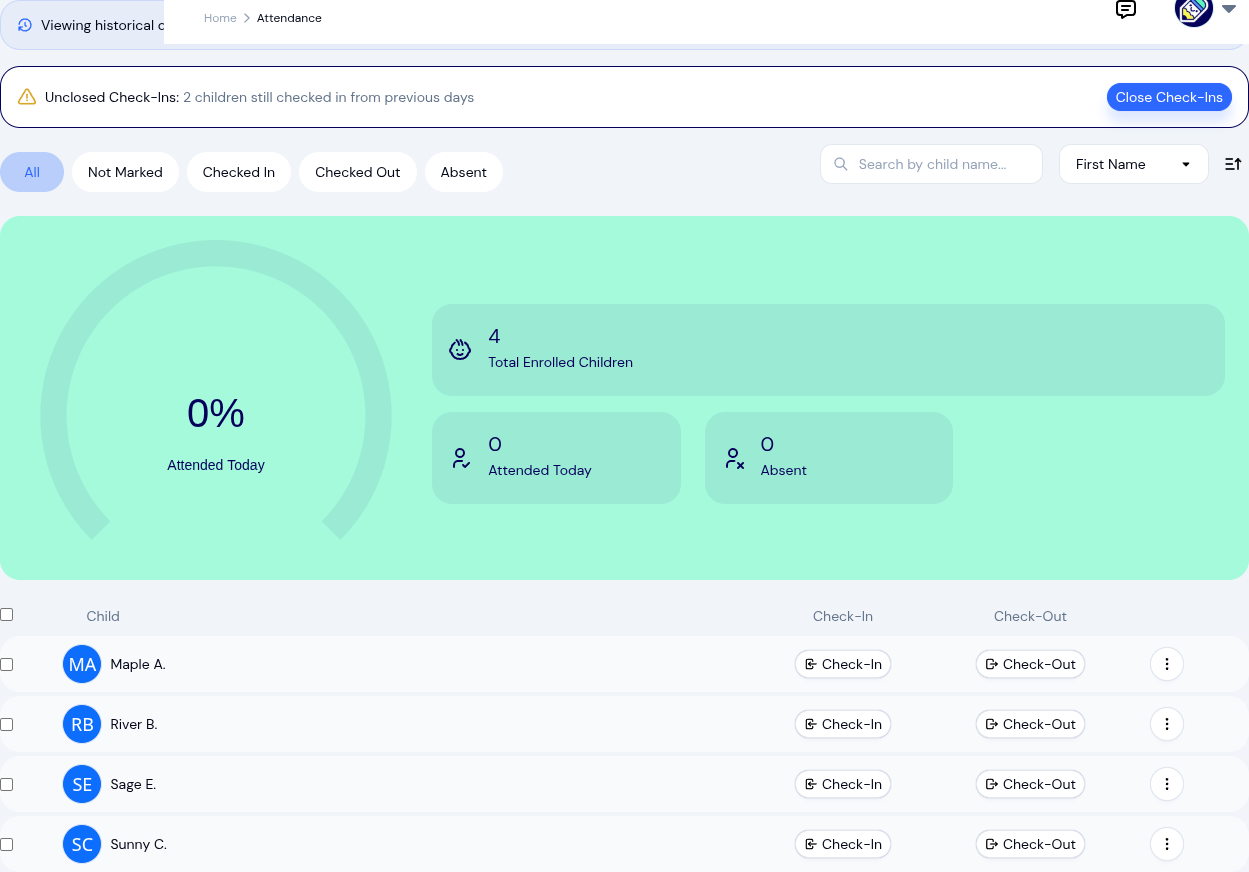
The attendance page now includes a date picker that lets you view any previous day's attendance exactly as it was recorded. Select a date, and you'll see every child's status for that day — who was checked in, checked out, marked absent, or missed entirely. It's the same familiar attendance interface, just pointed at a different day.

Edit Historical Records
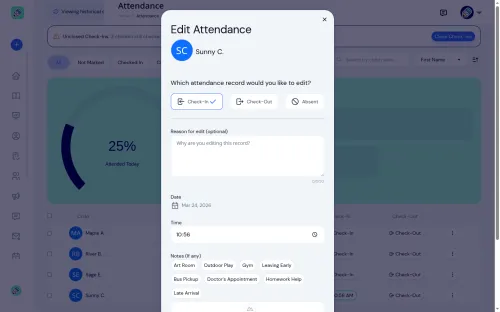
When you find a record that needs correcting, the edit flow asks for two things: the updated information and an edit reason. The reason is required — it becomes part of the permanent record, so anyone reviewing the history later can see what changed and why.
Common corrections include:
- Fixing check-in or check-out times that were entered incorrectly
- Updating auto-closed records where staff forgot to check out a child and the system closed the record at end of day
- Adding notes that were missed during the original check-in
- Correcting the wrong attendance status (e.g., a child marked absent who was actually present)
Delete Historical Records
Sometimes a record shouldn't exist at all — a child was checked in on the wrong day, or a duplicate entry was created. Authorized staff can delete historical attendance records, again with a required reason. The deletion is logged, so the audit trail remains intact even when a record is removed.
Permission Controls
Not everyone should be able to rewrite history. KidzLog gives center owners fine-grained control over who can edit and delete past attendance records:
- Role-based access — configure which roles (owner, admin, teacher) can edit or delete historical records
- Lock period — set a number of days after which records become locked and can no longer be modified, even by authorized staff. This prevents changes to records that have already been used for billing or submitted for compliance
These settings live in Settings > Attendance, alongside your other attendance configuration.
The Audit Trail
Every edit and deletion is recorded with the staff member's name, a timestamp, and the reason they provided. This audit trail is visible on the attendance record itself, so there's never any ambiguity about what the original record looked like versus what it looks like now.
For centers that undergo licensing audits, this is exactly the kind of documentation auditors want to see — not just accurate records, but evidence that corrections are tracked and explained.
Why This Matters
- Mistakes get fixed instead of living permanently in your records
- Auto-closed records from forgotten check-outs can be corrected to reflect actual departure times
- Billing accuracy improves when attendance times are correct, not estimated
- Compliance confidence — auditors see a transparent correction process, not unexplained changes
- Staff accountability — the edit reason requirement ensures changes are deliberate and documented
Configuring It
Head to Settings > Attendance to set your lock period and configure which roles have editing and deletion permissions. The defaults are conservative — only owners and admins can edit by default — so you can open access gradually as your team gets comfortable with the workflow.
Historical attendance editing is available now on all KidzLog plans.
Ready to Simplify and Organize your Daycare?
Get started with KidzLog today!
KidzLog Team
Related Articles
August Update: Enrollments and Fillable Forms
Families apply from your center's own page, parents complete a whole PDF on their own device, and the attendance report...

July Update: Safe Arrival and Incident Forms
Safe Arrival accounts for every child by your drop-off deadline, incident reports now use your state's own wording, and...

June Update: Document Signing and QR Check-In
Send documents for online signatures, offer QR check-in, file audit-ready incident reports, and review enrollment...