New: Planned Absences and Late Arrivals
Families can tell you ahead of time when their child will be away or late, and your team sees it before the day starts. A week of vacation, a sick day, a dentist appointment in the morning: each one is recorded once, appears wherever staff take attendance, and counts toward the day's numbers.
Families report it themselves
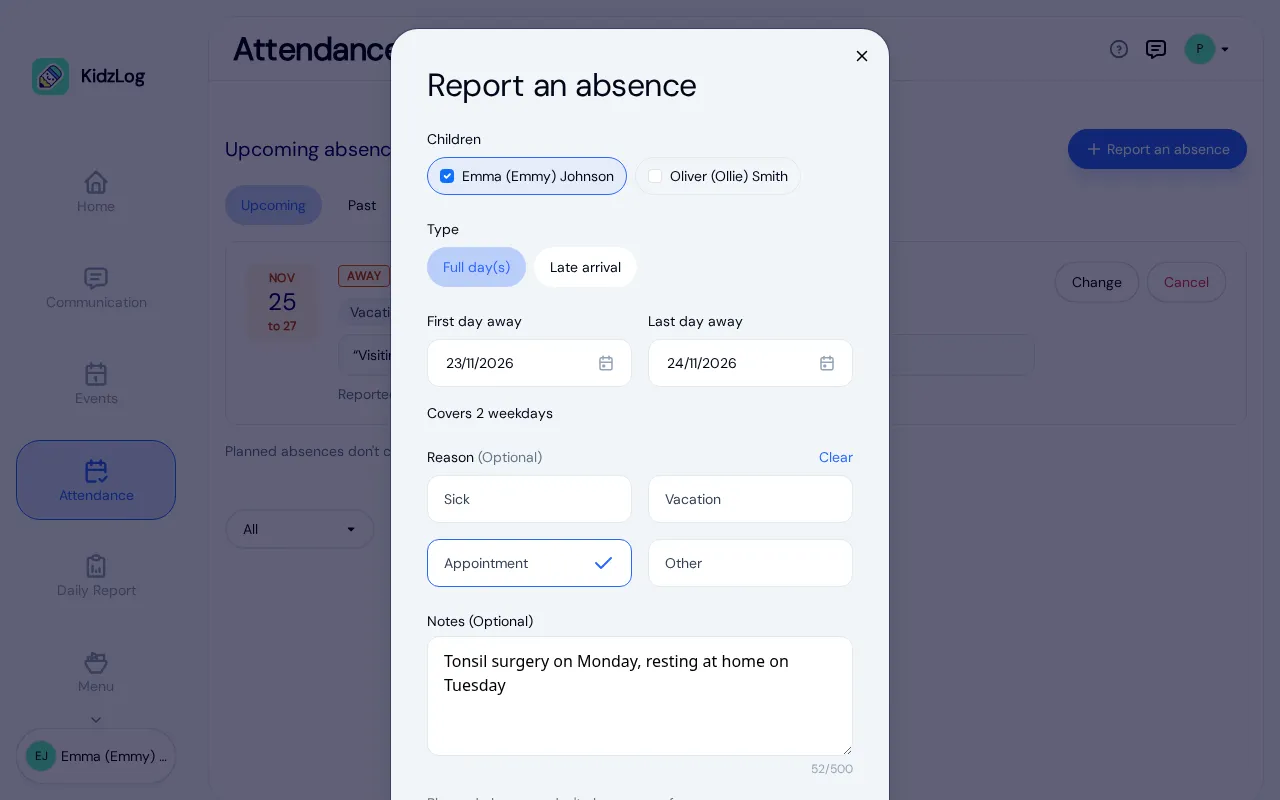
On their Attendance page, or on their child's page, a guardian selects Report an absence. They choose:
- one child or several, for siblings who are away together;
- Full day(s), with a first and last day away, or Late arrival, with the time they expect to drop off;
- a reason if they want to give one: Sick, Vacation, Appointment or Other;
- a note for the center, up to 500 characters.
The form counts the weekdays it covers and skips weekends. It also tells families that planned absences don't change their fees, which answers the question before they have to ask it.
Once it is sent, the family sees a confirmation and gets an email receipt. The absence then sits in their Upcoming list, where they can change or cancel it. Cancelling the rest of a longer absence keeps the days that have already passed.
Your team hears about it
Owners, admins and the child's room teachers get an email when a guardian reports, changes or cancels an absence or a late arrival. Each person can turn these emails off in their own notification settings.
Staff can report one too, from the child's Absences tab or from the attendance page, for families who phone the center. Staff can also enter days that have already passed, within your center's rules for editing past attendance. Guardians who receive absence emails are told about an absence staff enter.
On the day, the child carries a Planned absence label on the attendance page, the kiosk and the check-in list, or Late, expected with the time for a late arrival. Nobody at the front desk has to wonder whether a family forgot to call.
Safe Arrival waits for a late child
If your center uses Safe Arrival, a planned absence counts as accounted for, so a family gets no alert about a day they already reported. A late arrival works the same way until the expected time. After that time, plus your center's grace period, Safe Arrival follows up as it would for any child who has not arrived.
See who is away this week and next
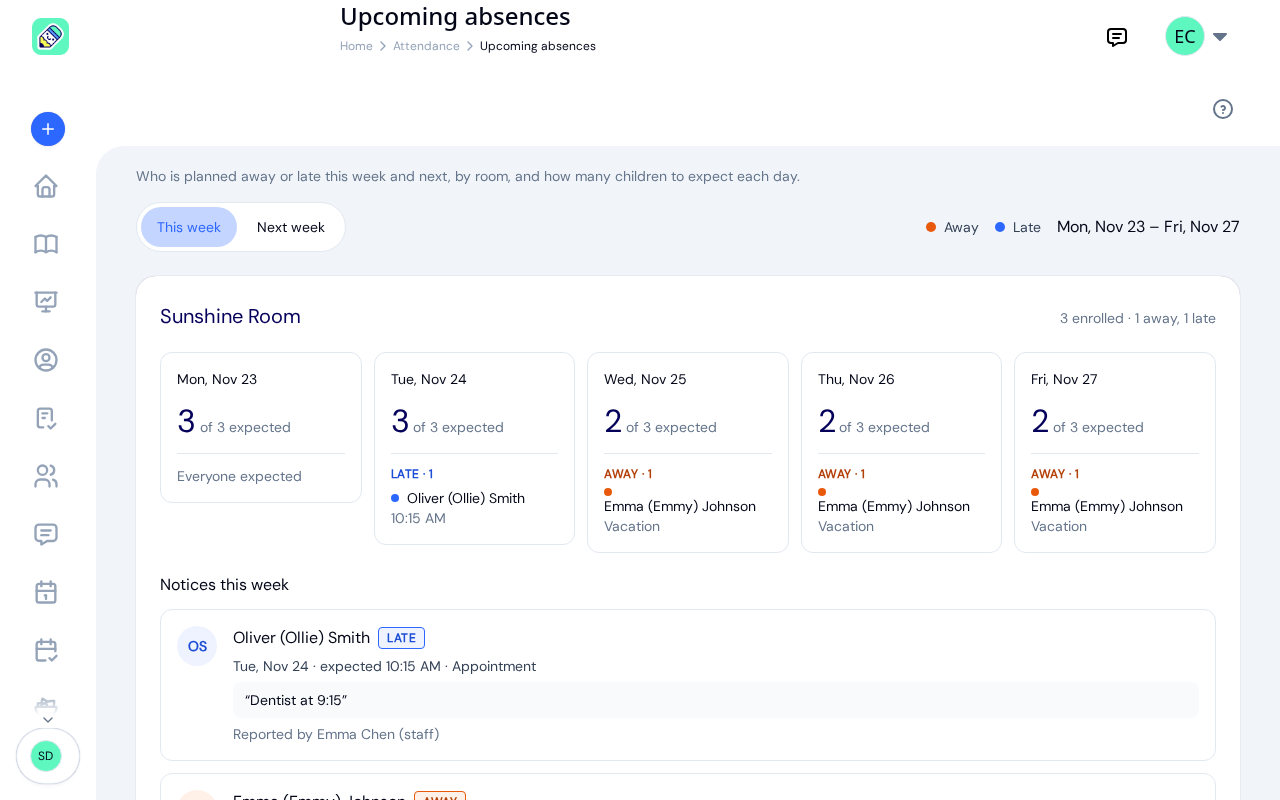
The Upcoming absences page, opened from the attendance page, shows each room's week:
- every weekday, with how many children to expect out of those enrolled;
- who is away and who is arriving late, with the reason or the expected time;
- the week's notices underneath, with the family's note and who reported it.
Switch between This week and Next week to plan staffing and rooms ahead. Teachers see their own rooms, and owners and admins see the whole center.
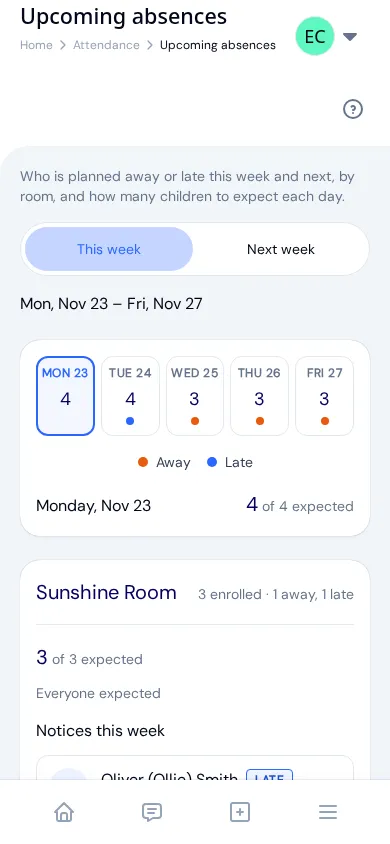
On a phone, the page opens with a row of five day buttons. Each shows that day's count, with a dot when someone is away or late, and tapping one shows that day's children room by room.
In your attendance records
Each day of a planned absence is recorded as an absence in the child's attendance, linked to its reason. A check-in on that day still counts, so a child who turns up after all is simply checked in.
The attendance report splits the absent days in a report into planned, unexplained and sick days, which makes patterns easier to see and easier to explain to a licensing inspector. Every report, change and cancellation is kept in your center's activity history as well.
Planned absences are part of KidzLog's attendance tracking, alongside check-in, the kiosk and Safe Arrival. For an overview of what attendance software should cover, see our guide to daycare attendance software.
Ready to Simplify and Organize your Daycare?
Get started with KidzLog today!
KidzLog Team
Related Articles

March Update: Communication Hub and Enrollment
Reach parents by SMS, move children between programs in bulk, archive child profiles at graduation, and track...
We're Live! KidzLog is Officially Out of Beta
KidzLog is out of beta: attendance tracking, parent communication, and child records for daycare centers and...

October Update: Document Steps and Room Posts
Staff see the document steps waiting on them, parents follow each step in order, teachers post to their whole room, and...