How to run daily health screening at your childcare center
At a childcare center, drop-off is when illness arrives. A child runs a fever overnight, a parent in the rush doesn't realize symptoms have spiked by morning, or the early signs of something contagious slip past everyone before the day starts. Daily health screening is the gate.
Done well, it does three things at once: it keeps sick children at home where they need to be, it keeps healthy children from exposure, and it gives staff a clear, factual record of what was asked and answered each morning.
This guide walks through what daily health screening looks like in practice: the questions to ask at drop-off, what to log every time, and what to do when an answer raises a concern. It is written for directors building or refining the workflow. Staff and parents will benefit, but the structure has to come from the person running the center.
Why daily screening matters
Two things hinge on the morning check.
The first is the room. Childcare ratios mean one sick child in a toddler room can mean five sick children by the end of the week. Catching a fever or a fresh rash at the door is the cheapest, most effective infection-control step a center has.
The second is the record. When something does go around, whether a stomach virus through the preschool room or hand-foot-and-mouth in the infant group, public health may ask when symptoms started and who was present. A center that has been logging morning screening answers can produce a complete answer in minutes. A center that hasn't is reconstructing it from memory.
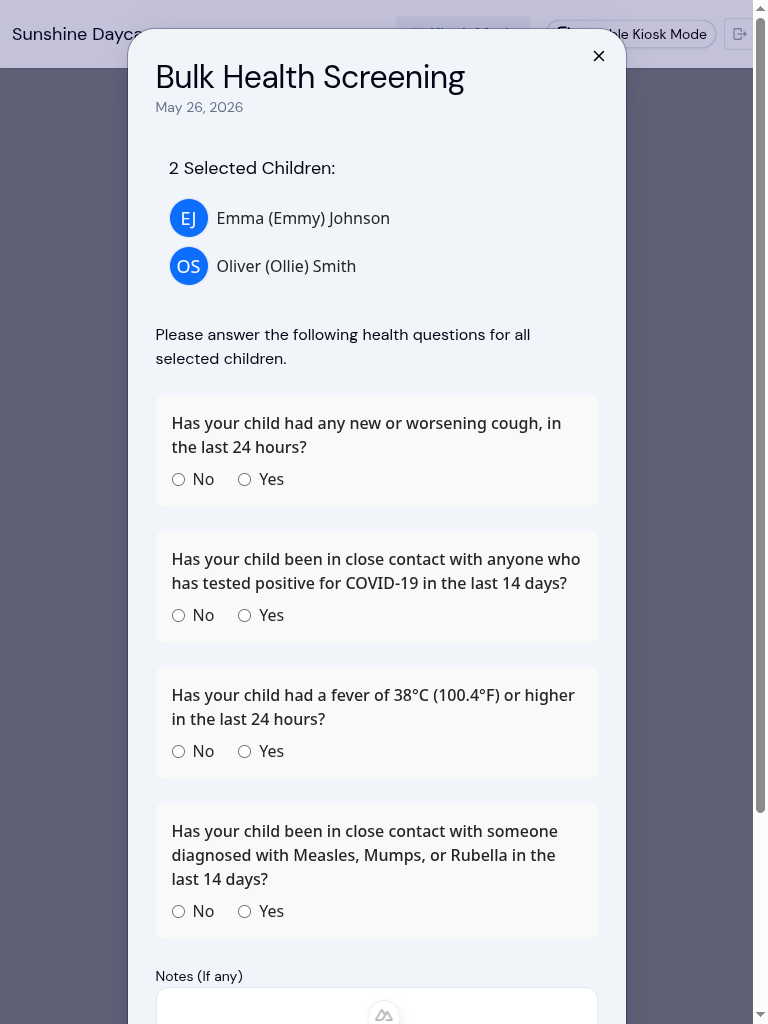
What to ask: the morning questions
The screening doesn't need to be long, and it should be the same every day. Five or six questions, asked the same way by every staff member, gets you most of the value. Common ones:
- Has the child had a fever (over 38°C / 100°F) in the past 24 hours?
- Any vomiting or diarrhea since yesterday?
- A new rash, persistent cough, or unusual runniness that wasn't there before?
- Any medication given today that staff should know about?
- Has the child been exposed to a known illness at home, with siblings, or at another center?
- How is the child this morning in general: energy, mood, appetite?
The last one matters more than it sounds. A parent who answers "she's been a bit clingy and didn't want her usual breakfast" is telling you something even if every other answer is no.
For infants and toddlers, add a brief visual check by the staff member: flushed cheeks, eyes, breathing. Not a diagnosis, just a second pair of eyes.
What to log every time
Log the same fields every morning, for every child, even when the answer is "all clear." Empty days are data too.
- Time of the screening
- Who screened (the staff member's name)
- Each question and answer as a structured field, not a single free-text blob
- Temperature if it was taken
- Any symptoms noted by staff during the visual check
- Action taken if anything flagged: sent home, monitored, parent contacted later
- Parent acknowledgment (a signature, a kiosk PIN, an in-app confirmation, whatever the center uses)
Structured fields are the difference between "we did screening" and "we have answers to specific questions on specific days." When the room comes down with strep, you want to be able to filter for everyone who answered yes to "sore throat" over the past two weeks, not page through narrative notes.
If your center uses digital check-in, the screening is usually attached to the same workflow. The screening prompts come up before the child is marked present, and the answers travel with the attendance record into the same secure storage.
What to do when an answer flags
Three buckets cover most situations.
Green: the child stays. All answers clear, no visual concerns. Mark them in and carry on.
Yellow: talk before deciding. One soft yes (mild cough, slept poorly, a single loose stool yesterday). Have a 30-second conversation with the parent at the door. Document what was said and what was decided. If the child stays, set a check-in time so a staff member knows to look in on them mid-morning.
Red: the child stays home. Active fever, vomiting in the past 24 hours, an unexplained new rash, or any of the exclusion criteria in your provincial or state guidelines. The conversation here isn't whether but how. When can the child return, what symptoms need to clear, do they need a doctor's note. The center's exclusion policy should be one page, written down, and given to families at enrollment so this conversation isn't a surprise.
The red bucket is also where centers most often wish, after the fact, that they had a clean record of the morning. "We sent them home because the parent confirmed at drop-off they'd had a fever overnight" is a much easier sentence to write when the screening log actually says that.
How KidzLog supports this
KidzLog builds health screening directly into the morning check-in. The questions appear on the kiosk or in the staff view, answers are stored as structured fields against the day's attendance record, and the kiosk PIN doubles as the parent's acknowledgment. The question set itself is yours to define: add, remove, or reword each question to match your center's exclusion policy and your provincial or state requirements. When an answer comes back red, the system flags the record for follow-up rather than requiring staff to remember to act later.
Because the screening is part of attendance and not a separate side log, the data shows up in the same reports as the attendance record itself. That's what makes it usable later when you need to answer public-health or licensing questions without reconstructing anything. Parents also see the day's screening answers through the same activity feed they use for daily updates, so there's no separate "we sent the morning notice" step.
Make it easy on everyone
The best morning screening is one that takes thirty seconds per child and doesn't make drop-off feel like an interrogation. Short consistent questions, structured fields, a clear three-bucket workflow, and one written exclusion policy. That's most of it. The rest is just doing it every day.
For directors building this from scratch: start by writing your six questions and your exclusion policy. Then choose how to capture the answers. Paper to start is fine, digital is better, but the cheapest mistake is to skip the writing-down step entirely. Once the questions and the policy exist, the daily habit comes quickly.
Ready to Simplify and Organize your Daycare?
Get started with KidzLog today!
KidzLog Team
Related Articles
Safe arrival: accounting for every child
A practical guide to daily child-accounting: setting a drop-off deadline, comparing expected versus present, and what...

Ontario's SADP Law and Daycare Attendance
Ontario's SADP policy sets safety standards for licensed daycares. What it requires, and how digital attendance...
September Update: Incident Reports and Records
Reopen and correct an approved incident report, choose when parents get the email, send families a note on declined...